
Employee Scheduling Software
Best Employee Scheduling Software For Small Business for 2026 for Germany
Features, costs, and usability of the top 7 scheduling programs compared





There is no doubt that digital employee scheduling software is essential for today's shift operations. But how do you find the right solution for your business? In this article, we present the seven leading scheduling programs and compare them based on functionality, costs, and usability.

Criteria for Selecting the Best Employee Scheduling Software
Essential Core Features:
Shift Scheduling: Digital scheduling software automates many steps in shift planning, saving time and costs in operations
Time Tracking / Time Clock: Precise time tracking via time clock or manual entry, plus creation of clear timesheets and work schedules – especially important after the recent BAG ruling
Absences & Leave Management: A section for managing absences, sick leave, and vacation requests with clear calendar overview and simple approval processes.
Availability: Employees can independently enter their availability or preferred times into the system, ensuring time-efficient staff planning.
Employee Records: An employee database that enables easy management of all relevant employee information.
General Program Requirements:
Easy to Use: Intuitive user interface for administrators & employees
Adaptability: Ability to customize to company structure
Value for Money: Suitable feature set for the given pricing structure
Customer Support: Reliable support via chat, phone & email
Additional Important Features:
Document Management: Section for managing all important employee documents within the scheduling software
Training and Onboarding: Creation and provision of training materials or a helpdesk, so employees can be trained regardless of location.
Communication Tool: Direct communication with employees through the scheduling software.
Integration / API: Integration options with other systems and an API to integrate the software into existing systems.
Top Selection of Leading Employee Scheduling Software

Our test winner Aplano stands out with its intuitive shift planning software, characterized by simple operation and a versatile feature set. The system enables direct use without training or onboarding for both administrators and employees.
The Aplano shift planning app is available for free on Google Play and the App Store. Employees can view their shifts at any time, enter availability, submit vacation and shift swap requests, and much more. The app's simple usage ensures high employee satisfaction in operations, making employee scheduling run more smoothly.
Since time tracking forms an important part of personnel planning in today's operations, a tool for documenting working hours is essential. Aplano's integrated time tracking tool offers a high degree of customization for specific requirements, while its straightforward user interface makes it particularly easy for employees to use.
The cloud-based platform is suitable for companies of any size and industry. Businesses with multiple locations get location-independent access to all relevant system data. Additionally, Aplano helps companies comply with labor law requirements by automatically detecting conflicts such as maximum working time violations. Aplano's scheduling software positions itself in first place as a flexible and efficient shift planning solution that not only saves time but also optimizes processes and simplifies staff planning.
Core Features
Strengths
Weaknesses
Pricing & Contract Terms


Crewmeister ranks 2nd in our selection of top scheduling software. The system is clearly structured and offers both employees and administrators user-friendly scheduling software. The program is specifically designed for small and medium-sized businesses and stands out with fair pricing.
Similar to Aplano, the app allows employees to view their shifts in real-time, record preferred times, and submit shift swap requests. The app's user interface is also clearly designed and mostly equipped with only the necessary functions, making it easier for users to learn and benefiting employee satisfaction.
Crewmeister also offers an integrated time tracking tool that includes core functions for effective working time documentation. The time clock is quite simple but all the more understandable for employees and enables documentation of both shift and break times.
The scheduling program impresses with simple operation and comparably fast implementation in operations. Complex and industry-specific functions were omitted, which makes the system all the more attractive for businesses across various industries. Crewmeister's pricing structure is also fairly designed and the reason why the software ranks 2nd in our selection.
Core Features
Strengths
Weaknesses
Pricing & Contract Terms

3rd place in our selection goes to Papershift, which offers flexible scheduling software for medium to larger companies. The program enables rapid shift plan creation through an automated shift assignment function based on employee availability and qualifications. This feature facilitates staff planning especially for larger organizations.
The shift planning app provides the team with access to current shift schedules and also enables entering availability. Like its competitors, Papershift offers an integrated tool for both time tracking and internal company communication.
Multiple locations can also be registered under one account via Papershift. The program stands out with a relatively large feature set and high adaptability.
Due to the extensive functionality, the software unfortunately loses some clarity and therefore requires somewhat longer training times compared to its competitors in the market.
Core Features
Strengths
Weaknesses
Pricing & Contract Terms

Staffomatic finds its place in our top selection due to its user-friendly interface, satisfactory feature set, and the software's special pricing structure. Unlike other scheduling software, Staffomatic offers various packages that can be individually tailored to your company's needs. This way, businesses only pay for the features they actually need, saving costs without sacrificing quality or performance.
Staffomatic's shift planning app includes the most important core functions for the team, similar to its competitors. This includes viewing current shift plans and shift times, entering availability, and creating requests to management. Staffomatic's shift planning app's daily view stands out from typical displays by implementing it as a vertical timeline, presenting an original alternative.
In summary, Staffomatic forms a good and reliable shift planning software with a clear user interface and fair pricing structure. The system includes the most important core functions for effective staff scheduling, but currently lacks an integrated chat tool for internal communication.
Core Features
Strengths
Weaknesses
Pricing & Contract Terms
Annual contract: Scheduler+Leave Planner: €1.80 - Scheduler+Time Tracking: €1.80 - Professional: €3.60 - Premium: €5.40 per employee per month

Ordio is a new scheduling program that specializes in gastronomy and hospitality businesses, but also finds application in other industries. The program offers an extremely modern user interface with clear navigation overview via a sidebar on the left side of the application. Additionally, the system offers integrations with POS systems to directly connect payroll with the scheduling software.
Through Ordio, employees can view shift schedules and request changes like typical scheduling programs. The software additionally offers a checklist function to share tasks with the team and track their completion status. Employees can clock their shift times via the app to precisely document working hours through the system.
The cloud-based platform of this newcomer impresses with its user interface and feature set. Unfortunately, the pricing is somewhat expensive for small businesses but forms an optimal solution for businesses with high employee numbers.
Core Features
Strengths
Weaknesses
Pricing & Contract Terms
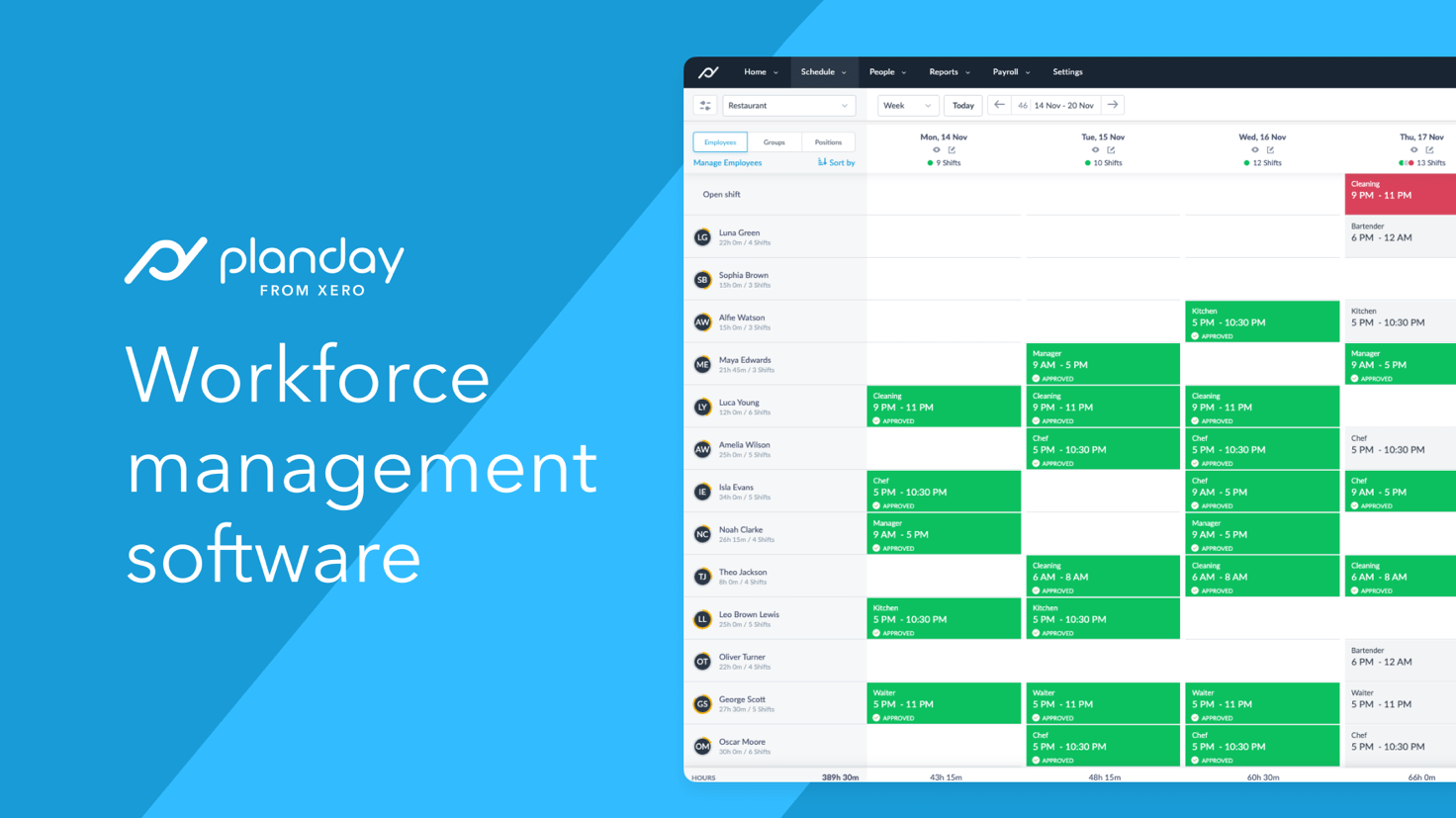
Planday secures its place in our top 7 selection of the best scheduling software through its intuitive user interface and extensive features. The system also stands out with its scalability and adaptability across various industries. Particularly noteworthy is the variety of integration possibilities Planday offers with existing payroll and time tracking systems.
The mobile app is clear and easy to understand for both administrators and employees. Core functions such as entering availability, viewing shift times, and tracking working hours are part of the app. Functions are easily discoverable in the app, contributing to high employee satisfaction in operations.
Planday's integrated communication tool facilitates internal coordination between employees and management to ensure smooth workflows. However, the scheduling software is somewhat expensive for small businesses in its full version and is therefore more suitable for businesses with high employee numbers.
Core Features
Strengths
Weaknesses
Pricing & Contract Terms

In last place is Google Sheets in our selection of leading shift planning systems. While the program is not a specialized shift planning tool, it offers a solid foundation for creating schedules, especially in small businesses, thanks to its versatility and adaptability. Through Google Sheets, companies can create tables to organize shift schedules and then share them with the team. The cloud-based platform allows all participants access to the shift schedule tables and supports real-time collaboration in operations.
After a brief training in the program, usage is quite intuitive and can be extensively employed. The program offers, for example, the ability to create templates for shift schedules, which can significantly speed up shift plan creation. Comments and conditional formatting also support staff planning via Google Sheets.
Although the system was not specifically developed for shift planning, it offers a cost-effective alternative for businesses needing a quick and simple solution to organize shifts, especially for small businesses.
Core Features
Strengths
Weaknesses
Pricing & Contract Terms
Benefits of Using Employee Scheduling Software
The main advantages of using employee scheduling software include:
Efficiency and Automation: Scheduling programs automate many business processes such as time tracking, vacation approvals, and payroll. This reduces manual data entry and administrative tasks.
Compliance and Data Security: Staff scheduling programs help companies comply with labor laws and regulations and reduce the risk of violations.
Improved Communication: By simplifying administrative tasks, scheduling programs enable managers and executives to focus on business areas beyond personnel management.
Time Savings: By simplifying administrative tasks, scheduling programs enable managers and executives to concentrate on additional business areas instead of dealing with paperwork.
Cost Reduction: Through automation and elimination of paperwork, companies can reduce their operational costs in staff scheduling.
Scalability: Scheduling software can scale with a company's growth and easily handle both increasing employee numbers and additional processes.
Employee Satisfaction: Through access to the scheduling system, employees have the ability to manage their own information, submit vacation requests, and view important documents. This promotes both satisfaction and engagement among employees.
Conclusion on Using Employee Scheduling Software
When your business's requirements for scheduling software are clearly defined, choosing the right program becomes significantly easier. The system should not only include necessary functions and fit within budget, but also ensure simple operation for both administrators and employees.
It's also important to test the program for a limited period to ensure smooth application after implementation in operations. A test run should also be conducted with employees to ensure their satisfaction.
More Interesting Articles:
Ready for stress-free shift planning?
4.8 / 5 on Capterra · 4.7 / 5 on OMR Reviews